monsterbrain
Available for development setups – technical details: Host apps.
monsterbrain is the danwos desktop app for keeping track of a knowledge folder: file tree, the file rendered for its type, links and metadata, and a change view that shows what agents changed. deciwa adds the review to it:
review on the rendered file – Markdown, HTML and the new side of a diff get the same bars, card and keys as in the browser,
review on source code – Python files and the source of Markdown and HTML files, element by element,
review on data – JSON and YAML files as a tree, value by value,
state in the tree and the change view – each file shows how much of it is open, approved, stale or frozen, and which questions wait for an answer,
feedback of the active file in monsterbrain’s right panel,
the facts view – every fact of the facts files with its state, approved one by one or a whole file at once (A fact is a structural bloc... (DEC_FACT_BLOCKS)),
questions instead of
[CHECK]markers (deciwa replaces the [CHECK]... (DEC_REPLACES_CHECK)) – what the AI asks shows up at the element and in the change view,same data as everywhere else – feedback goes to
.deciwa/in the folder, sodeciwa todo, Claude and the other integrations see it.
deciwa comes as a monsterbrain extension and brings its engine along – no Python, no terminal (Host apps get deciwa as an ... (DEC_HOST_EXTENSIONS), The Python parts can be shi... (DEC_STANDALONE_ENGINE)). Without the extension monsterbrain works as before, just without review.
In monsterbrain
Review mode –
Shift Ror the switch Review on/off next to View · Source · Diff; it shows when the file is reviewable. Then the keys of the review UI work on the rendered file:a r f dfor a verdict,0–5for stars,nfor a comment,vguided review,j knext and previous element. Outside review mode monsterbrain keeps its own keys.Side panel – the section Review · deciwa holds the deciwa panel of the file: what is open, approved, stale, the questions, the whole project.
Tree and change view – a mark per file:
2?open questions, a number for jobs for the AI,3/5required elements approved,✓all reviewed.Diffs – the new side of a rendered or side-by-side diff is reviewable; an approved paragraph that changed shows as stale.
Source code – Python files in the code view: classes, functions, methods and the statements outside functions (imports, assignments,
if __name__ …) are elements (Altclick for the class around a method); an approved function that changes shows as stale. The Source tab of a Markdown or HTML file works the same way, line by line.JSON and YAML files – monsterbrain shows them as a tree; every node is an element, from the whole document down to a single value (JSON and YAML files are rev... (DEC_DATA_ADAPTERS)). Selecting a node inside a collapsed part opens it; reformatting the file or reordering keys keeps the review, a changed value makes it and the nodes around it stale. The Source tab works line by line as for Python.
HTML files – the rendered page is reviewable with the same elements as its source; the review switch and
Shift Rwork for the page, the page’s own deciwa button opens its panel.Facts (
Ctrl 4) – deciwa fills monsterbrain’s facts view: every list item, table row and free paragraph of a file in20_facts/with its group (approved, open, stale, question, unverified), counted per folder and file. A click on a fact opens the file there in review mode, soaapproves it;✓on a file or folder, orShift Aon the active file, approves every fact not approved yet and the file as a whole. A whole-file approval shows✓at the file and gets stale (✓!) on any change.Inform Claude – the button next to the review switch tells the Claude session of the folder about the review (monsterbrain’s agent actions). It covers the file’s open concept when that concept – its folder or a file it lists under
results:– has review entries newer than the last hand-over, else the file alone. Approvals count: Claude may be waiting for one. Claude reads the entries itself (deciwa show,deciwa todo); theircreatedtimes tell it what is new. The button is greyed out while nothing is new and only a click starts it; the time of the last hand-over is kept only while monsterbrain runs – deciwa stores nothing for it.Claude tools – monsterbrain’s MCP server gains
deciwa_feedback(the review state of a file, or every open job) anddeciwa_show(open a file at an element).
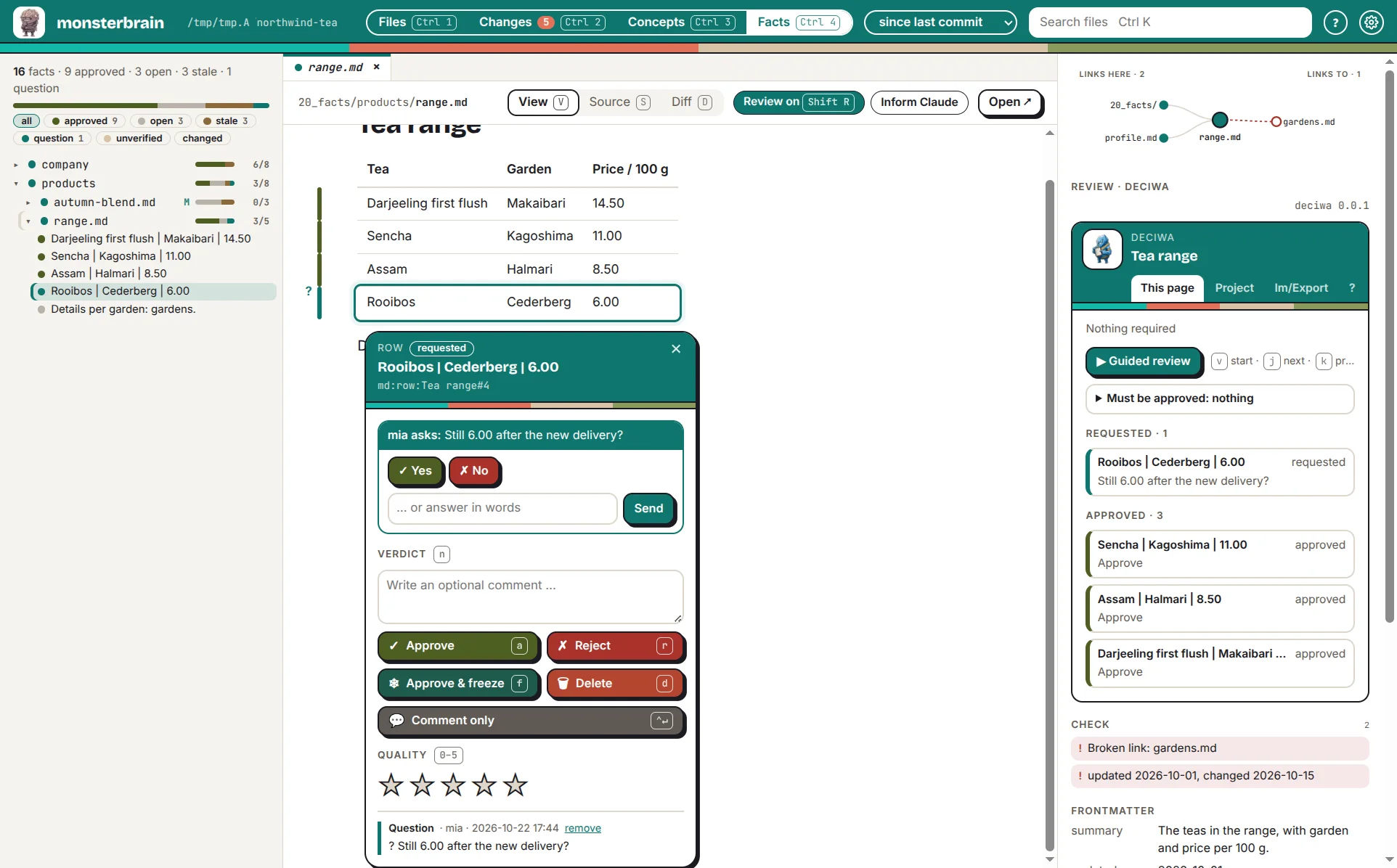
The facts view in monsterbrain: a click on a fact opens it in review mode.
The review data is the folder’s .deciwa/. A folder without one shows Set
up review in the side panel (deciwa init).
Setting up (development)
Until the standalone engine exists, the extension uses the engine of a deciwa checkout:
$ cd ~/workspace/deciwa && uv sync
$ cd packages/monsterbrain && npm ci && npm run build
In monsterbrain: settings (Ctrl ,) → Extensions → Add folder … →
~/workspace/deciwa/packages/monsterbrain, then Restart to apply. The
extension finds the engine in .venv of the checkout; another one can be set
in monsterbrain’s settings.json:
{"path": "…/packages/monsterbrain", "options": {"enginePath": "/path/to/deciwa"}}.